Changelog

Every 1FileTool release

New features, improvements, and fixes for 1FileTool — the offline file toolkit for Mac and Windows. Every update ships locally; your files never leave your device.

v1.10.0

LatestSeptember 2, 2026

AI Chat — Talk to Your Files

The AI Chat workspace with a Grok reply that created 1FileTool-Introduction.pdf, shown as a result card with Reveal Folder and Open with 1FileTool buttons and earlier chats in the sidebar
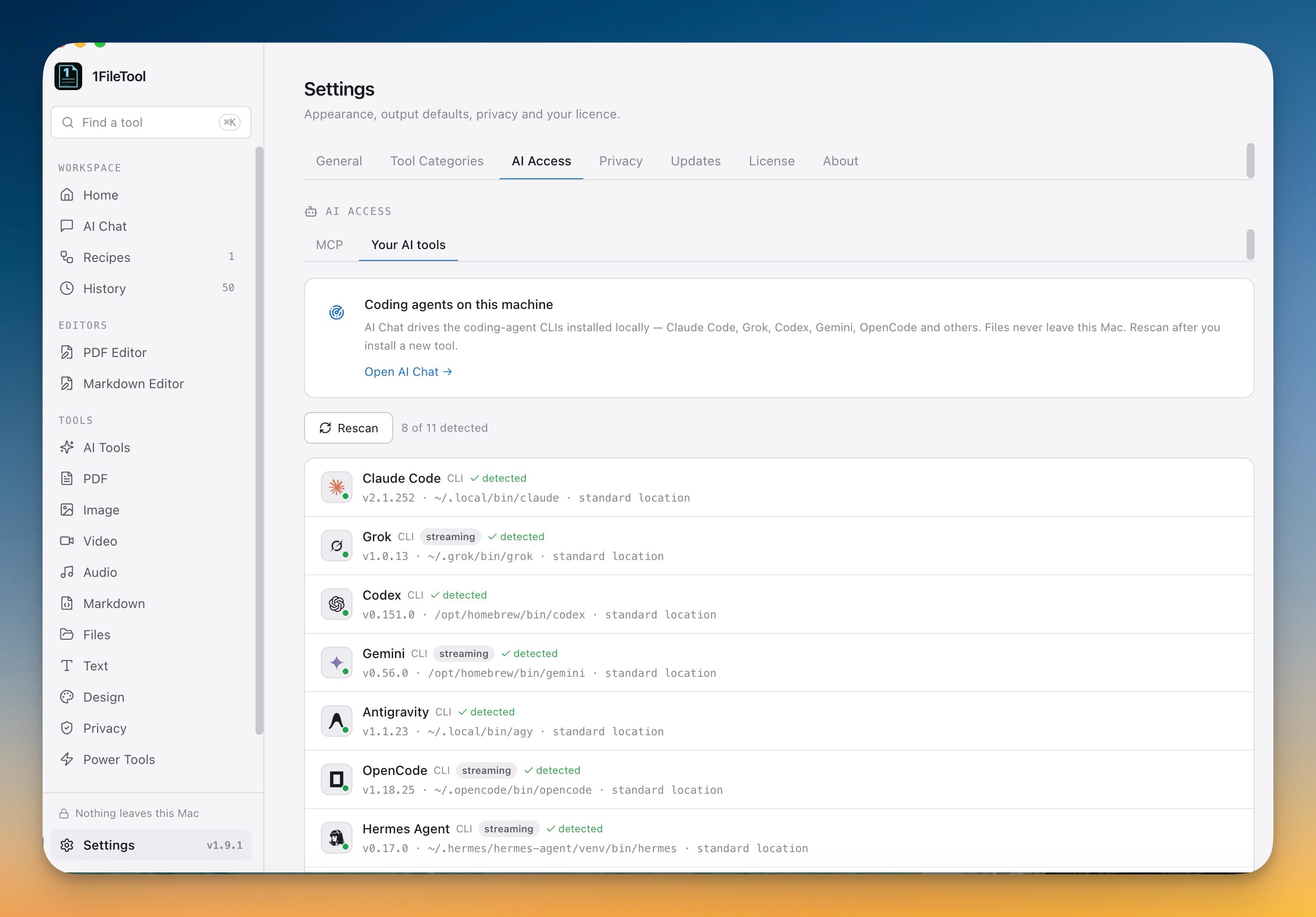
The Your AI tools tab in Settings AI Access showing 8 of 11 coding agents detected, listing Claude Code, Grok, Codex, Gemini, Antigravity, OpenCode and Hermes Agent with their versions and install paths

New Features

  • AI Chat — attach files or a whole folder and ask an AI to summarize, refactor, explain, rename, or fix them without leaving 1FileTool. It drives the coding-agent CLIs already installed on your machine — Claude Code, Grok, Codex, Gemini, Antigravity, OpenCode, Hermes Agent, Cline, Amp, Qwen and Aider — so only your instructions are sent and the files are read where they live. Let Auto pick the first agent it finds or choose a specific one and its model, watch supported agents stream their reply live, and open anything the agent creates or edits from a result card with Reveal Folder and Open with 1FileTool. Past chats stay in the sidebar, and if no CLI is detected you can rescan or install OpenCode from the app.
  • iPhone photos, everywhere — HEIC and HEIF images now work in every image tool instead of only the dedicated converter: compress, resize, convert, crop, rotate, flip and make icons from the photos your iPhone takes, strip location and camera data from them, and remove their backgrounds offline. Typing "HEIC" in search jumps straight to a HEIC to JPG tool.

Bug Fixes

  • Fixed iPhone photos failing to open in most image tools — HEIC and HEIF files now load and process everywhere instead of erroring out
  • Fixed photos coming out sideways after converting to another format — images now keep the right orientation when you change their format

v1.9.1

August 12, 2026

Better Navigation

1FileTool's macOS menu bar with the Image menu open, showing All Image Tools above Compress, Resize Image, Convert, Crop, Rotate, Flip and Adjust Brightness

New Features

  • Tools in the menu bar — Image, Video, Audio and PDF each get their own menu listing every tool in the category, plus an "All … Tools" entry, so Compress, Convert, Merge and the rest are one click away instead of a scroll through the sidebar.
  • A Tools menu for everything else — Files, Text, Privacy, Design, Markdown and AI grouped exactly as they are inside the app, with Compress / Convert / Resize / Watermark quick groups and direct entries for PDF Editor, Markdown Editor, Workflow Recipes, Folder Monitor and Power Tools.
  • A Go menu for your workspace — Home, History, Workflow Recipes, Folder Monitor and Settings in one place.
  • Settings from the keyboard — press ⌘, on Mac or Ctrl+, on Windows and Linux to open Settings instantly.
  • Support without leaving the app — Settings now links out to the website, feedback.stoicsoft.com and [email protected], and the Help menu carries the same 1FileTool Website, Send Feedback and Email Support entries.

Improvements

  • Windows and Linux look like a native desktop app — no empty band under the title bar, and the top of the window no longer swallows clicks meant for the sidebar or page.
  • Shortcuts and privacy copy match your device — Windows and Linux show Ctrl instead of ⌘, and "Nothing leaves this PC" instead of Mac-only wording.
  • The menu bar says 1FileTool — About, Hide and Quit use the real app name instead of a generic label.

Bug Fixes

  • Fixed video conversion to WebM failing every time — WebM now encodes with VP8 video and Opus audio, the formats the container actually accepts, so Convert → WEBM works like MP4, MOV, AVI and MKV.
  • Fixed "Open with 1FileTool" stacking the same files twice — a second handoff from Finder or File Explorer replaces the previous selection instead of doubling the list.

v1.9.0

July 25, 2026

AI Access, One Workspace

The AI Access tab in 1FileTool Settings showing the server listening on 127.0.0.1, Claude Code and Gemini CLI connected, and 64 operations available to the assistant
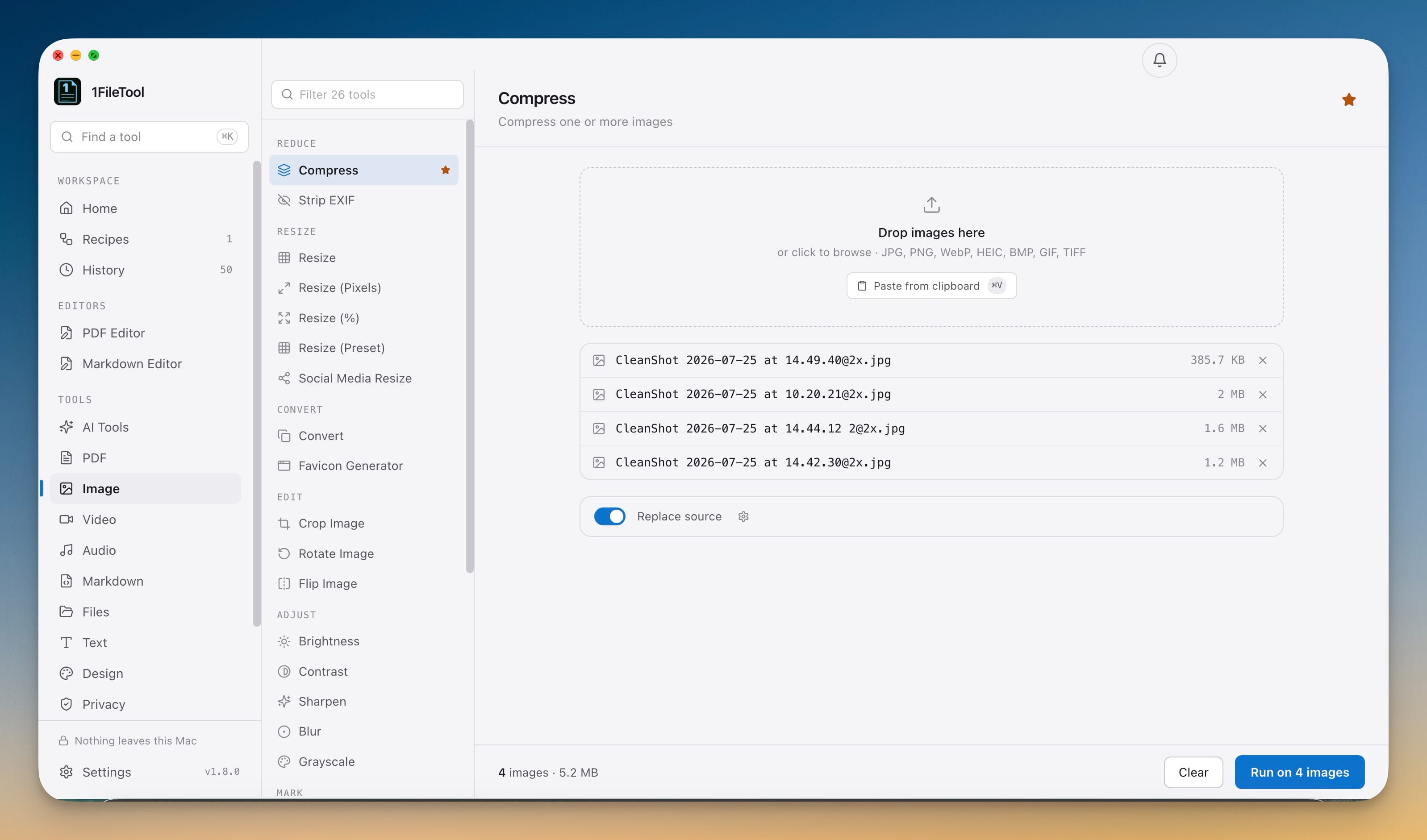
The Image category filtered to 26 tools and grouped into Reduce, Resize, Convert, Edit and Adjust sections, with four queued images and a docked Run on 4 images bar

New Features

  • AI Access (MCP) — let Claude Code, Codex, or Gemini drive 1FileTool in plain language. Say "use 1filetool mcp to compress these images" and 64 operations become available to your assistant: compress and convert images, PDFs, video and audio; split, merge and OCR PDFs; extract text; strip metadata; zip and rename; run your saved recipes. One click in Settings → AI Access wires up every CLI it finds. Files never leave your Mac — the assistant sends instructions only. Destructive jobs like Shred and Rename refuse without explicit confirmation, inspection questions cost no quota, and the whole thing stays off until you switch it on.
  • A faster way through 200+ tools — filter the tool list as you type, browse each category by the job it does (Reduce, Resize, Convert, Edit, Protect) instead of one long list, switch tools without losing your files or settings, and keep the run button docked at the bottom with your file count and total size.
  • Pick up where you left off — Home now shows your last three jobs so you can jump straight back into the tool and file you were using, plus a recent-output list showing which tool produced each file, how long ago, and a click to reveal it in Finder.
  • Know your daily allowance before you start — a free-file counter in the sidebar counts your 8 daily files down as you work, and every tool page repeats the count in the run bar so the limit never surprises you mid-batch.

Improvements

  • The sidebar free-file meter updates the moment an AI-driven job finishes, so the count is right whether you pressed Run or your assistant did
  • Searching for "AI", "MCP", or "assistant" jumps straight to the AI Access setup screen
  • Rebuilt navigation — the sidebar is grouped into Workspace, Editors, Tools and Automation, with counts for saved recipes, watched folders and history
  • Every processed file now shows its size before and after plus the exact percentage saved, so a batch can't hide one file that grew
  • Replaced the fixed "Privacy Score 100%" on Home with a number you can check: total bytes uploaded to a server, always zero
  • One consistent look across PDF, Image, Video, Audio, Text, Files, Design, Privacy and AI Tools — settings, drop zones, file lists and buttons all behave the same
  • A calmer colour scheme — one accent colour marks everything clickable, green is reserved for saved space and successful runs
  • Light and dark appearances rebuilt together, so neither feels like an afterthought
  • Every button, field and list item now shows a clear focus outline as you tab through the app
  • Processing and success screens dropped the confetti in favour of the numbers that matter

Bug Fixes

  • Fixed Power Tools being unreachable — the category had a page but no sidebar entry, and its Run button had no visible background
  • Fixed the daily file count not updating after a run — the sidebar meter and run bar now refresh the moment a job finishes
  • Fixed the notifications bell sitting underneath the upgrade button — both are now fully visible and clickable
  • Fixed files that grew during compression showing a misleading saving — a larger result now shows an amber "+4%" instead of hiding in the batch total
  • Fixed the Save button being covered by the upgrade button in the Recipes workspace

v1.8.0

July 19, 2026

On-Device Background Removal

1FileTool's Background Removal tool showing the one-time offline model download, output-background options (transparent, white, black, custom), and a drop zone accepting JPG, PNG, WebP, HEIC, TIFF, AVIF and BMP images
A cafe photo of four friends after 1FileTool removed the background, leaving the people and table as a clean transparent PNG cutout

New Features

  • On-Device Background Removal — remove image backgrounds fully offline after a one-time model download, in single images or full batches with per-file progress and cancellation. Supports JPG, PNG, WebP, HEIC, TIFF, AVIF, and BMP; export a transparent cutout or replace the background with white, black, or a custom color. Right-click a supported image and choose Remove Background to jump straight in.

Improvements

  • Much cleaner cutouts — upgraded the offline AI from 320px Silueta to the 1024px IS-Net model, with smoother confidence-based edges and preserved existing transparency
  • Clearer background-removal setup — see the one-time model download size and progress, cancel a download, or delete the model to reclaim storage
  • Safer image compression — JPG, PNG, WebP, and GIF compression now keeps the original file whenever reprocessing would not make it smaller
  • Leaner on-device AI support — desktop releases include only the files your OS and computer need

Bug Fixes

  • Fixed background-removed images showing horizontal scan lines and broken transparency
  • Fixed small PNGs losing clean transparency after compression
  • Fixed compressed images becoming larger than the originals
  • Fixed photos changing orientation after compression
  • Fixed batch compression producing unreadable files for unsupported formats

v1.7.0

July 17, 2026

Background Updates & Flexible Pro Licensing

New Features

  • Background Software Updates — keep converting and processing files while a new version downloads in the background, with a compact progress notice and install-on-quit control
  • Flexible Pro Options — compare 1, 3, and 5-device one-time licenses and open the matching checkout directly, plus see bundle and next-app loyalty savings

Improvements

  • Clearer Free vs Pro comparison showing the Free plan's 8-file daily allowance next to unlimited processing, full-length on-device AI, live Smart Folder automation, and workflow recipes
  • Simpler update renewals — keep using your current Pro version forever after its included update period ends, and renew only when you want future features
  • One place for license details — plan, registered email, active devices, update eligibility, activation options, and renewal choices together

Bug Fixes

  • Fixed background update downloads stopping after a connection change — they now retry automatically and keep their status visible
  • Fixed opening the update window restarting an in-progress download — the current download now continues in the background with its progress intact
  • Fixed Restart & Install reopening the previous version on macOS — the app now closes cleanly so the update can finish installing

v1.6.0

July 17, 2026

Quiet Updates, Clearer Pro

New Features

  • Background Software Updates — keep converting and processing files while a new version downloads in the background, with a compact progress notice and install-on-quit control
  • Flexible Pro Options — compare 1, 3, and 5-device one-time licenses and open the matching checkout directly, plus see bundle and next-app loyalty savings

Improvements

  • Clearer Free vs Pro comparison showing the Free plan's 8-file daily allowance next to unlimited processing, full-length on-device AI, live Smart Folder automation, and workflow recipes
  • Simpler update renewals — keep using your current Pro version forever after its included update period ends, and renew only when you want future features
  • One place for license details — plan, registered email, active devices, update eligibility, activation options, and renewal choices together

Bug Fixes

  • Fixed background update downloads stopping after a connection change — they now retry automatically and keep their status visible
  • Fixed opening the update window restarting an in-progress download — the current download now continues in the background with its progress intact
  • Fixed Restart & Install reopening the previous version on macOS — the app now closes cleanly so the update can finish installing

v1.5.0

July 13, 2026

On-device AI (read-aloud, audiobooks, voice cleanup), silence cutting, and true redaction

The 1FileTool AI Tools page with Read Aloud, Document to Audiobook, and Voice Cleanup, labeled as on-device tools where nothing is uploaded
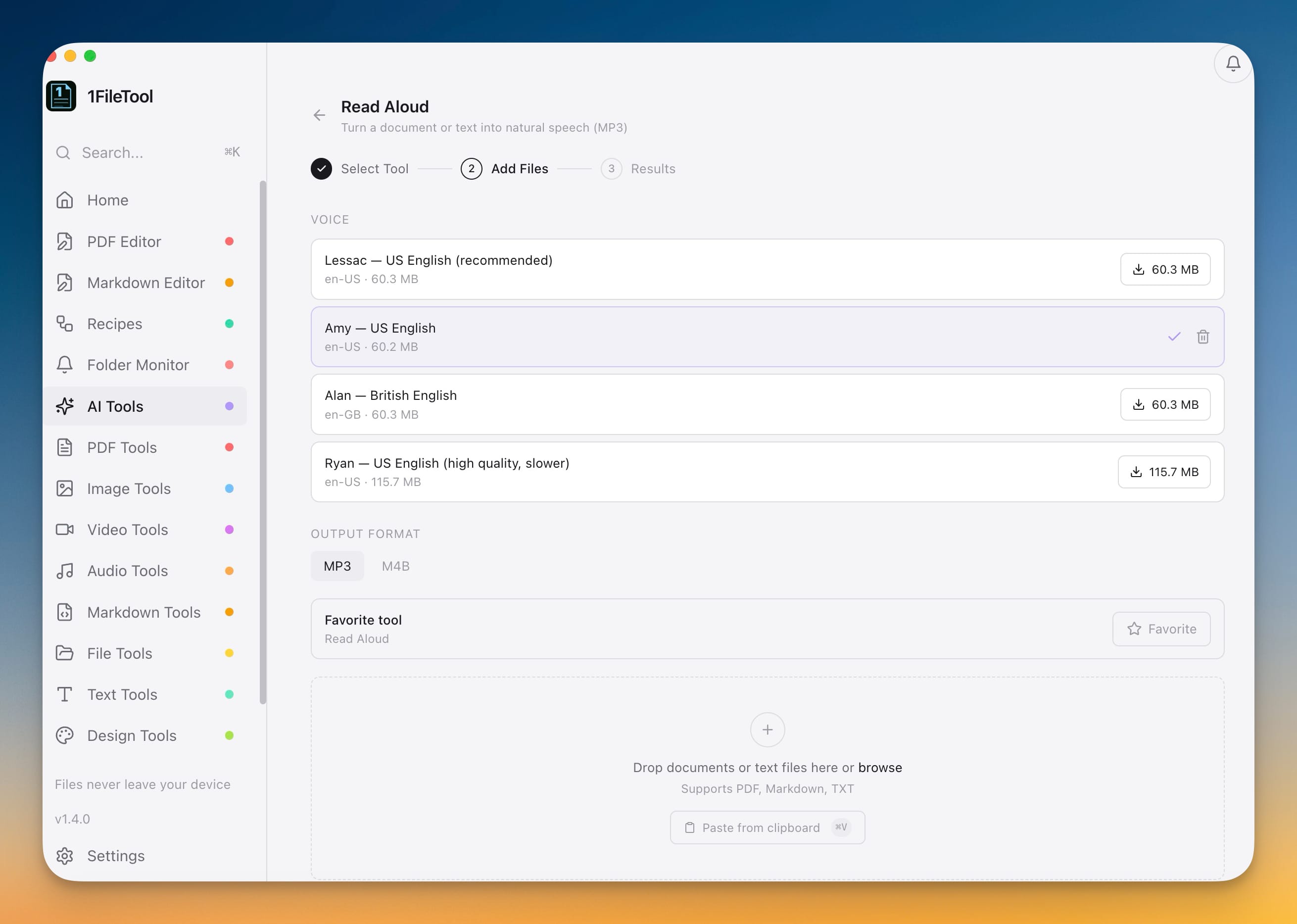
The Read Aloud voice picker offering Lessac, Amy, Alan, and Ryan voices with one-time download sizes and an MP3/M4B output toggle

New Features

  • AI Tools — All On Your Device: Read Aloud turns a document or text file into natural speech (MP3), Document to Audiobook converts a PDF or Markdown file into a chaptered M4B or MP3 with chapters pulled from headings and bookmarks, and Voice Cleanup removes background noise, hum, and hiss from recordings. Everything runs offline, you pick from several natural voices downloaded once, and you can try each tool free with a short preview before unlocking full-length output and batch with Pro.
  • Silence Cut for Video and Audio: automatically remove silent gaps from screen recordings, lectures, sermons, and podcasts; review the cut plan and how much time you'll save before exporting; and tune silence sensitivity and the padding kept around speech.
  • Visual Duplicates: find near-duplicate photos rather than just exact copies, auto-pick the best version of each group (largest and sharpest) and send the rest to a review folder, running on thousands of photos entirely on your device.
  • True Redaction & PII Detection: Detect PII scans a PDF for emails, phone numbers, SSNs, and credit card numbers; Auto-Redact PII finds and permanently removes them in one click; and Verify Redaction confirms nothing sensitive is still hidden or recoverable.
  • Smart Folders: content-aware Folder Monitor rules that sort and route files by what's inside them — match on name, file type, or text content, rename matches with date/year/month tokens, move matching files into subfolders, preview changes with a dry run, and start from Invoices, Screenshots, and Bank-statement presets.

Improvements

  • Background Tasks: long jobs now run in the background with a status bar in the corner, so you can keep using other tools, run several operations at once, watch each one's progress from any page, cancel a running task anytime, and reveal finished files in one click.
  • Faster batch processing: image, PDF, and video batches now process multiple files at the same time to finish sooner.
  • New AI Tools category appears at the top of the sidebar and shows up automatically for existing users.

Bug Fixes

  • Redaction now permanently removes content instead of only covering it with a black box, so redacted text can no longer be copied out or recovered.

v1.3.1

July 1, 2026

Folder Selection

Folder drag-and-drop screenshot showing folders being added to the Compress tool
Compress tool drop zone showing two folders dragged in so supported image files can be collected automatically

New Features

  • Folder Selection: Drop whole folders into any file drop zone and 1FileTool collects supported files inside
  • Select folders from the file picker instead of opening folders and selecting files one by one

Improvements

  • Cleaner large-folder handling skips duplicates and adds folder contents in a consistent order
  • Open multiple files from Finder more reliably on macOS
  • Linux release packaging prepares downloads with the right file type support

Bug Fixes

  • PDF image watermark file selection now accepts the PDF plus JPG or PNG watermark image in the same selection
  • The sidebar and Recipes page now consistently show the 1FileTool app name

v1.3.0

June 26, 2026

Workflow Recipes

1FileTool Workflow Recipes view showing the Privacy Upload Pack recipe — a Manual Run trigger flowing into Compress Image, Add Prefix, and Create ZIP steps, with saved templates and a trigger panel

New Features

  • Build multi-step file workflows — chain everyday file actions into saved recipes you can run again whenever the same job comes up.
  • Start from ready-made recipes — use Privacy Upload Pack, Image Web Pack, or PDF Delivery Pack as a starting point, or create a blank workflow.
  • Process more file types in one flow — combine image, PDF, video, audio, privacy, rename, and ZIP actions in a single recipe.
  • Run recipes from Folder Monitor — watched folders can now run a saved recipe when new files arrive, not just a single tool.
  • Review recipe history — see manual and Folder Monitor runs, success status, output files, and what each step produced.
  • Open with 1FileTool — right-click supported images, PDFs, videos, audio, Word documents, data files, and archives into 1FileTool from your system file picker.
  • Choose the best tool before processing — 1FileTool shows matching tools for the files you opened, grouped by type.
  • Send files straight to the tool page — picked files load automatically into Compress, Convert, Merge, Extract, metadata, ZIP, File Info, and other matching tools.
  • Open multiple files at once — mixed selections are grouped so each file type gets relevant actions without re-dropping files inside the app.

Improvements

  • Recipe outputs stay organized — each workflow run saves final files into a dedicated recipe folder, with an option to keep intermediate files when you need them.
  • Folder Monitor shows recipe runs clearly — monitors label recipe targets, show the number of enabled steps, and include recipe activity in monitor history.

v1.2.0

June 19, 2026

PDF to Word & Word to PDF

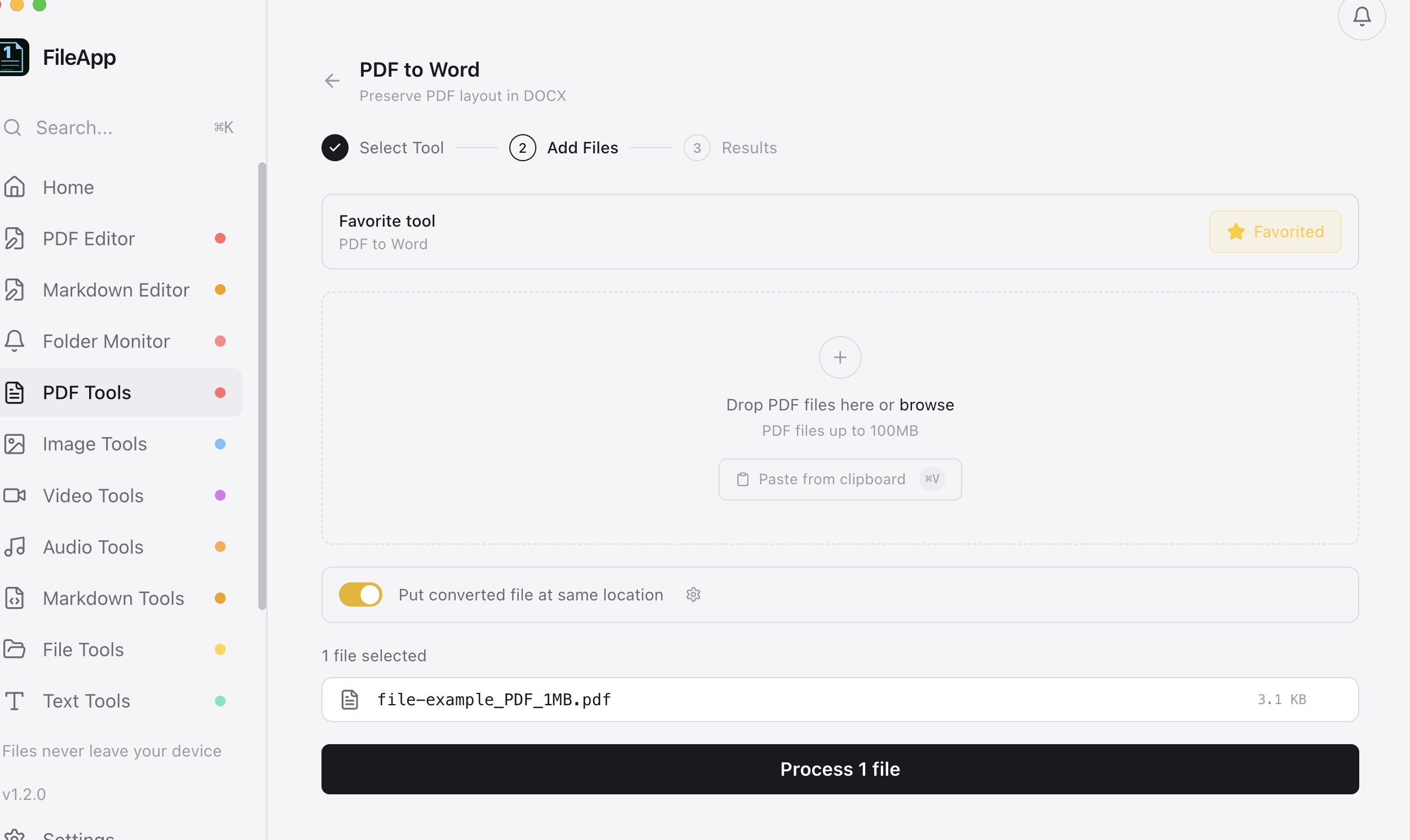
PDF to Word tool on the Add Files step with a sample PDF selected and "Put converted file at same location" enabled, ready to process
PDF to Word tool on the Results step showing a finished DOCX you can reveal in Finder or drag into any app

New Features

  • PDF to Word & Word to PDF
  • Anonymous Usage Analytics

Improvements

  • Smarter output placement — conversion tools save the new file next to your original instead of replacing it
  • Batch conversion keeps going when a file fails — skips unreadable files and reports which were skipped

Bug Fixes

  • Fixed Repair PDF failing on encrypted or password-protected PDFs
  • Fixed batch conversion aborting on the first bad file

v1.1.0

June 15, 2026

Favorites, unified batch tools, and a cleaner workflow

1FileTool Home dashboard showing favorited tools pinned for one-click access
Unified tool page where a single Convert tool replaces the separate per-format converters

New Features

  • Favorite Tools
  • Unified Batch Tools
  • Settings — Tabbed Layout
  • Markdown to HTML

Improvements

  • History page now shows accurate file sizes for batch jobs
  • Better history search and sorting works correctly even for batch tools
  • "Replace source" is now on by default for new users
  • Cleaner workflow on every tool page — file list appears after output options
  • Better keyboard accessibility — tool cards support Enter and Space keys with ARIA labels

Bug Fixes

  • Fixed history not updating file paths after replacing source
  • Fixed batch operations showing zero file sizes in history

v1.0.5

April 3, 2026

Batch Compress — Real-Time Per-File Progress

Improvements

  • Batch Compress — Real-Time Per-File Progress
  • Software Updates — Release Notes

Bug Fixes

  • Fixed batch compress only showing the first file's progress
  • Fixed Check for Updates dialog not opening

v1.0.4

April 3, 2026

PDF Compression & Video Tools Now Fully Built-In

Improvements

  • PDF Compression — Now Fully Built-In
  • PDF Tools — All Built-In
  • Video & Audio — Reliable After Packaging

Bug Fixes

  • Fixed video tools failing in the built app
  • Fixed PDF compression showing a confusing warning

v1.0.3

April 3, 2026

Markdown Tools & Editor, Folder Monitor, SVG to PNG

1FileTool Folder Monitor panel showing a watched folder with auto-process settings and live event log
1FileTool Markdown editor with split view showing source and rendered preview side by side

New Features

  • Markdown Tools (10 tools)
  • Markdown Editor
  • Folder Monitor
  • Notification Center
  • SVG to PNG

Improvements

  • Compression stats after processing
  • Smarter progress screen
  • File sizes shown in drop zone
  • Better drag and drop

v1.0.2

March 31, 2026

Visual PDF Editor, Tool Presets, Clipboard Paste & Drag Out

New Features

  • PDF Editor
  • Tool Presets
  • Clipboard Paste
  • Drag Out to Other Apps
  • Sidebar Customization

Bug Fixes

  • Fixed app failing to launch after packaging

v1.0.0

March 31, 2026

One app. Every file. 273 tools, all processed locally.

1FileTool home dashboard showing processing stats, quick actions, and tool categories
1FileTool PDF tools panel with 39 tools for merging, compressing, converting, and securing PDFs

New Features

  • PDF Tools (39 tools)
  • Image Tools (37 tools)
  • Video Tools (25 tools)
  • Audio Tools (16 tools)
  • File Tools (23 tools)
  • Text Tools (30 tools)
  • Design Tools (14 tools)
  • Privacy Tools (4 tools)
  • Power Tools (85 tools)
  • Dashboard & Navigation

Keep the next file job off the internet.

Every tool is in the free download. Upgrade once, when the daily limit starts getting in your way.

PrivateOfflinePay once

No account, no credit card. Pro includes a 7-day money-back guarantee.