Features / Offline PDF Editor
A PDF editor that runs 100% offline
Merge, split, compress, redact and annotate PDFs entirely on your own Mac or PC. No file ever touches a server — so confidential contracts, tax forms and medical records stay private. Pay once, not every month.
100% offline · No upload · Free for 8 files/day
The problem with cloud tools
Online and cloud-based alternatives come with real trade-offs.
Your documents get uploaded
Tools like Smallpdf, iLovePDF and Adobe cloud require you to upload every PDF to their servers. Sensitive contracts, IDs and financial records pass through third-party infrastructure you do not control.
Endless monthly subscriptions
Cloud PDF editors charge $7–$20 every month — forever. A few edits a year can quietly cost you hundreds of dollars while you keep paying for features you rarely touch.
No internet, no editing
Browser-based editors stop working on a plane, on hotel Wi-Fi, or behind a corporate firewall. File-size caps and daily limits get in the way exactly when you are in a hurry.
Everything an online PDF editor does — without the upload
- Merge, split, reorder, rotate and delete pages in seconds
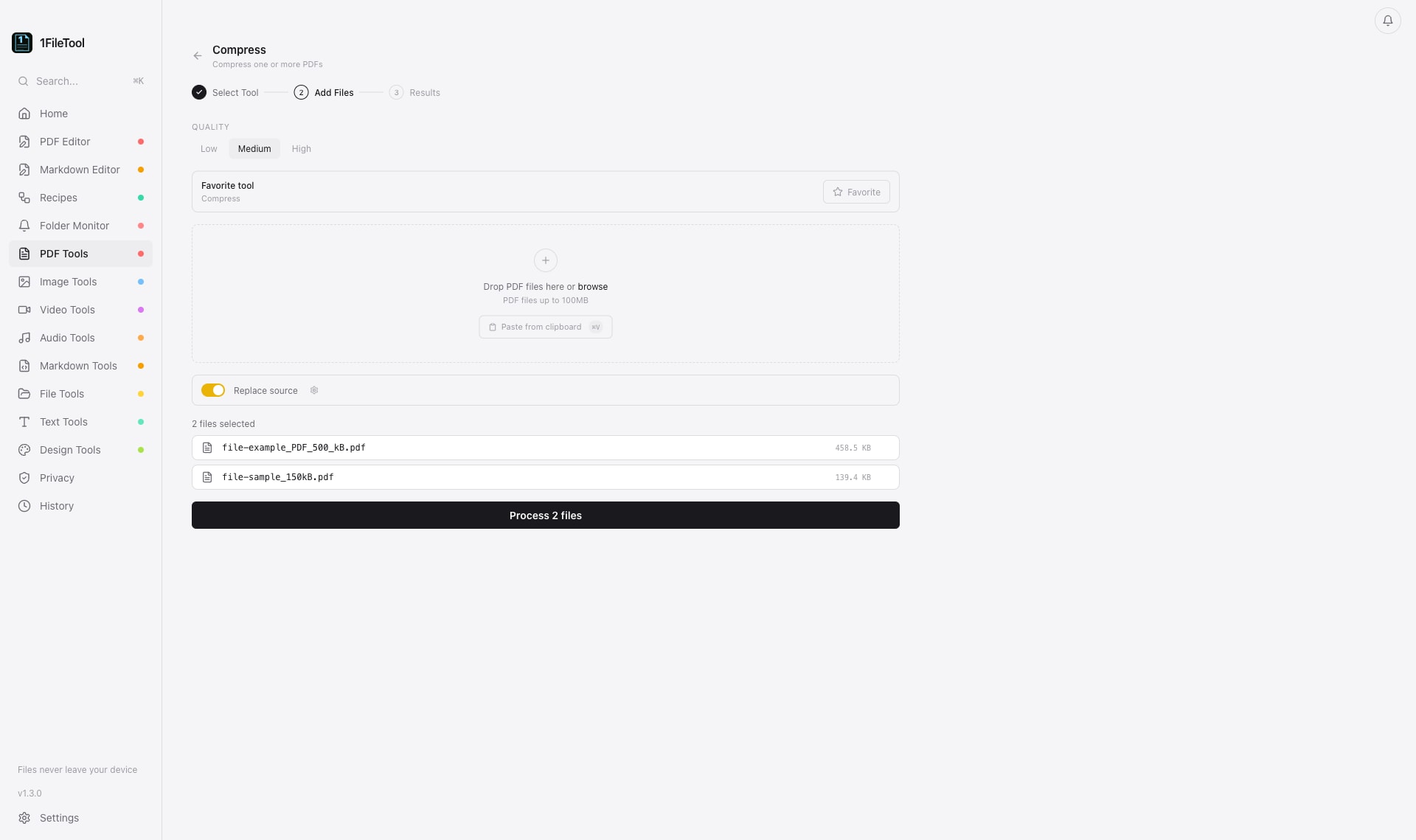
- Compress large PDFs to shrink file size while keeping quality
- Password-protect, encrypt, decrypt and set permissions locally
- Redact sensitive content and strip metadata before sharing
- Add text, highlights, annotations, watermarks and page numbers
- Fill and flatten forms, run OCR, and convert to and from images
What you can do
Built for offline pdf editor that stays on your machine.
Merge & split
Combine dozens of PDFs into one, or split a long document by page or range — drag, drop, done.
Compress PDFs
Reduce file size for email and uploads without the blurry results cloud compressors leave behind.
Secure & redact
Encrypt with a password, set permissions, and permanently black out confidential text before sharing.
Annotate & edit
Add text, highlights and sticky notes, or open the visual PDF Editor to place text, watermarks and page numbers and reorder pages.
Convert both ways
Turn PDFs into JPG or PNG and build PDFs from images — all processed on your machine.
Never uploaded
Every operation runs locally. Disconnect from the internet and the editor still works perfectly.
Tools included
Every one of these runs 100% offline inside 1FileTool.
Merge PDFs
Combine multiple PDFs into one
Split by Page
Split into single pages
Split by Range
Split by page ranges
Extract Pages
Extract specific pages
Delete Pages
Remove pages
Reorder Pages
Rearrange page order
Rotate Pages
Rotate pages
Duplicate Pages
Duplicate pages
Compress
Compress one or more PDFs
PDF to JPG
Convert to JPG images
PDF to PNG
Convert to PNG images
PDF to Word
Preserve PDF layout in DOCX
Frequently asked questions
Is 1FileTool a fully offline PDF editor?
Yes. Once installed, every PDF operation — merging, splitting, compressing, annotating, redacting — runs entirely on your Mac or PC. No file is ever uploaded, and the editor works with your internet disconnected.
How does it compare to Smallpdf, iLovePDF and Adobe Acrobat?
Those tools process your PDFs on their cloud servers and charge a recurring monthly fee. 1FileTool keeps your documents on your device and is a one-time purchase from $29, with all PDF tools included on the free plan for up to 8 files per day.
Can I edit confidential or sensitive PDFs safely?
That is exactly what offline editing is for. Because nothing leaves your computer, contracts, tax forms, medical records and legal documents never pass through a third party — which also makes it a great fit for GDPR and privacy-sensitive work.
Does it run on Mac, Windows and Linux?
Yes. 1FileTool is a native app for macOS 13 Ventura or later (Apple Silicon and Intel), Windows and Linux (.deb and AppImage), with the same 42 PDF tools and identical functionality on all three.
Is it free?
All PDF tools are free to use for up to 8 files per day. For unlimited processing, upgrade to Pro once from $29 — no subscription, with a 7-day money-back guarantee.
Explore more capabilities
More ways to process your files privately, on your own device.
Image Converter
Image Converter · offline on Mac, Windows & Linux
Video Compressor
Video Compressor · offline on Mac, Windows & Linux
Batch File Converter
Batch File Converter · offline on Mac, Windows & Linux
Free File Converter
Free File Converter · offline on Mac, Windows & Linux
PDF to Word Converter
PDF to Word Converter · offline on Mac, Windows & Linux
Learn how
Step-by-step tutorials and documentation for offline pdf editor.
Edit PDFs privately, on your own machine
Download 1FileTool and get 42 offline PDF tools. Free for 8 files a day, Pro from $29 one-time.
Get 1FileTool